
Why Accessibility Overlays Don’t Work (And What Does)
You have probably seen the pitch. One line of JavaScript, ADA compliant in 48 hours, $49 per month. It is a compelling offer if you are a small business owner staring down the possibility of an accessibility lawsuit and trying to avoid spending $15,000 on a developer. The pitch is also, in a legally significant way, false. The Federal Trade Commission said so in January 2025.
This post explains the specific mechanisms behind overlay failure, what the current legal environment actually looks like, and what real accessibility remediation involves. It is not a scare tactic. It is the information you need to make a decision that will hold up.
Accessibility overlays are JavaScript tools that claim to bring websites into WCAG compliance without modifying source code. They do not work because automated detection tools, which overlays depend on, can identify only 20 to 30 percent of WCAG violations. The remaining issues require structural changes to HTML, semantic markup, and keyboard navigation that no client-side script can retroactively apply. Using an overlay does not eliminate ADA legal liability, and in January 2025 the FTC required accessiBe, a leading overlay vendor, to pay $1 million for misrepresenting what its product could do.
What an Overlay Actually Is
An overlay is a third-party JavaScript snippet you add to your site. It loads after your page and attempts to detect and patch accessibility problems in real time. Some products add a toolbar that lets users adjust font size, contrast, or spacing. Others claim to use AI to automatically remap your HTML for assistive technologies.
The underlying logic sounds reasonable. If your code has problems, fix them at render time before the user’s screen reader reads them. The problem is that this logic misunderstands how screen readers and other assistive technologies actually work.
Screen readers like JAWS, NVDA, and VoiceOver parse the Document Object Model at page load. They do not wait for JavaScript to finish running its patches. By the time the overlay script has identified and attempted to correct a missing ARIA label or an unlabeled form field, the screen reader has already moved past that element.
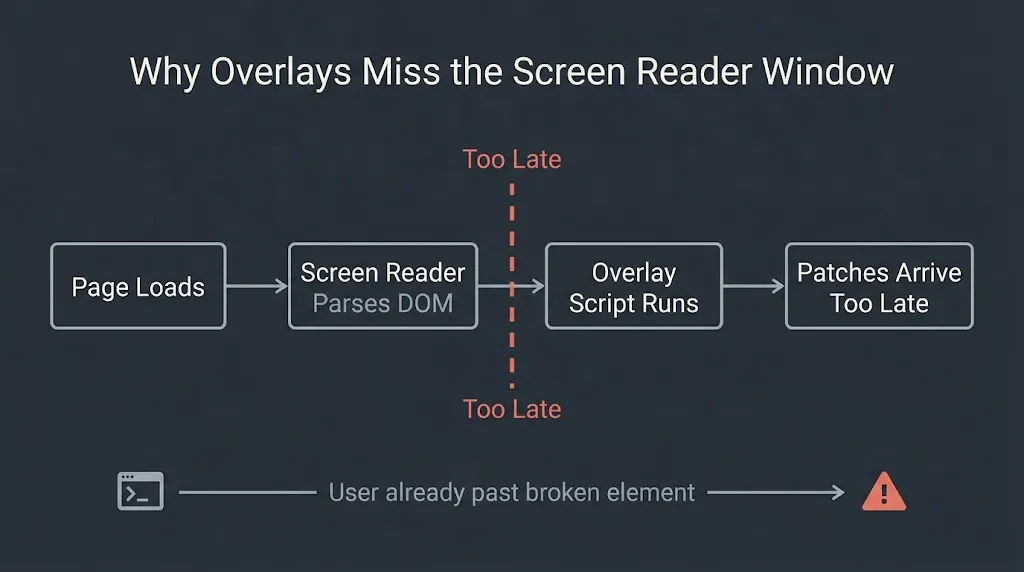
The Overlay Fact Sheet, a professional statement now signed by more than 1,000 accessibility experts including contributors to the WCAG, ARIA, and HTML specifications, documents this failure in precise technical terms: overlays apply fixes too late in the render cycle to benefit the users they claim to serve.
The 20 to 30 Percent Problem
Every overlay product is built on the same foundation: automated detection. Automated tools scan your HTML and flag issues they can identify programmatically. The ceiling on automated detection is well established. Automated tools catch approximately 20 to 30 percent of WCAG violations. The rest require human judgment: a tester who uses a screen reader, a keyboard-only user who can identify broken focus order, a person with low vision who can report whether a modal is actually navigable.
This means that even a perfect overlay, one that correctly fixed every issue it detected, would leave 70 to 80 percent of your accessibility problems untouched. The American Foundation for the Blind’s analysis of overlays specifically lists the categories of issues overlays consistently fail to address: ambiguous link text, unlabeled or mislabeled form fields, missing or incorrect heading structure, inaccessible PDFs, and broken keyboard navigation flows. These are not edge cases. They are among the most common WCAG failures on any given site.
The structural issue is that the problems overlays need to fix are in your HTML. They are in the semantic structure of your markup, in the relationships between elements that assistive technologies use to construct a logical document model for the user. You cannot fix a structural problem with a client-side JavaScript patch any more than you can fix a building’s foundation by painting the walls.
What the FTC Ruling Means for Buyers
The FTC’s January 2025 action against accessiBe is the most significant event in the overlay market to date. The complaint alleged that accessiBe misrepresented what its AI-powered overlay product could do, specifically that it could make websites fully compliant with WCAG and fully protect businesses from ADA litigation. The FTC’s press release on the accessiBe order is explicit: the company is required to pay $1 million, and the final order prohibits it from making these claims going forward.
This matters for buyers, not just for vendors. If the claims that drove you to consider an overlay were the ones the FTC just ruled false, then purchasing an overlay on the basis of those claims does not provide the legal cover you were sold. Courts and plaintiffs’ attorneys are aware of the FTC action. Using an overlay does not establish a good-faith compliance effort in the way that a documented audit and remediation process does.
ADA website accessibility litigation has been accelerating. Federal website accessibility lawsuits reached 3,117 filings in 2025, a 27 percent increase over 2024’s 2,452 cases. The accessibility.works data previously indicated that 25 percent of accessibility lawsuits named the overlay itself as the problem, not the underlying site. An overlay does not reduce your exposure. For some businesses, it has increased it.
The Performance Cost Nobody Mentions
There is a second, less-discussed cost to overlays: what they do to your site’s performance.
An overlay script is a third-party JavaScript file that loads on every page. Depending on the vendor and how it is implemented, it can add meaningful render-blocking weight to your page load sequence. That weight shows up in your Core Web Vitals metrics, specifically in Largest Contentful Paint (LCP) and Interaction to Next Paint (INP). The HTTP Archive 2025 Web Almanac reports that approximately 2 percent of desktop sites currently use accessibility overlay apps, a number that has remained relatively stable precisely because performance-conscious developers have been resisting them.
A slower site is a worse site for everyone, including users with disabilities who are already navigating a more demanding interface experience. Third-party scripts that run before your main content loads do not help anyone.
What Disabled Users Actually Experience
The most direct evidence against overlays comes from the people overlays claim to help. The Web Accessibility Survey’s data on overlay experiences documents a consistent pattern: screen reader users report that overlay toolbars conflict with their existing assistive technology, slowing down navigation or generating duplicate audio output. Multiple respondents describe actively installing browser extensions to block overlays from loading at all.
A blind user who has blocked your overlay is navigating your raw, unmodified HTML. If that HTML is not accessible, the overlay has not helped them. It has added one more obstacle.
This is not a fringe position. The Overlay Fact Sheet’s 1,000-plus signatories include people who use assistive technology daily. Their consensus is not ideological. It is based on experience with what these products actually do to their workflows.
What Real Accessibility Work Looks Like
Real WCAG compliance is a code problem, which means it requires a code solution. The work breaks into three categories.
The first is a proper audit. A manual accessibility audit, conducted by someone who tests with actual screen readers and keyboard-only navigation, identifies what is broken and prioritizes fixes by severity and frequency. Audit costs for a small to mid-sized business website typically run $2,000 to $8,000 depending on site complexity and the depth of the report.
The second is remediation. This is the development work: restructuring heading hierarchies, adding ARIA labels to interactive elements, fixing keyboard focus order, ensuring form fields are properly associated with their labels, and writing descriptive alt text for images. For a WordPress site with a custom theme, this is work that happens in the theme’s template files and component-level HTML. Overlay subscriptions cost $490 to $3,990 per year. Full remediation for a site in poor accessibility shape runs $5,000 to $25,000, with the spread tracking site size and the density of existing violations.
The third is ongoing maintenance. Accessibility is not a one-time state. New content, new pages, and plugin updates can introduce new violations. A content publishing workflow that includes an accessibility check at the authoring stage is cheaper in the long run than periodic remediation sweeps.
This is also where the distributed work model matters in practice. When a BetaTech developer patches a theme template file to correct heading structure and ARIA labeling, the change is in the codebase. It is documented, version-controlled, and reproducible. A ticket given at the end of a US business day is typically actioned before the next morning, compressing the review cycle without the overhead of a US-based agency. Compare that to an overlay patch that disappears the moment the subscription lapses.
The Compliance Requirement Is Getting Clearer
Federal requirements around web accessibility have become more specific, not less. The Department of Justice published a rule in April 2024 requiring state and local governments to conform to WCAG 2.1 Level AA, with compliance deadlines of two to three years depending on the jurisdiction’s size. Private businesses covered under ADA Title III do not yet have a codified federal technical standard, but courts have consistently applied WCAG as the de facto benchmark in litigation.
WCAG 2.1 Level AA is not an aspirational standard. It is a 78-point checklist of specific technical requirements. An overlay does not satisfy it.
The Honest Comparison
| Accessibility Overlay | Source Code Remediation | |
| Annual cost | $490 to $3,990 | $5,000 to $25,000 (one-time or periodic) |
| WCAG issues addressed | 20 to 30% (automated detection ceiling) | 100% (targeted by audit findings) |
| Screen reader compatibility | Often conflicts with existing AT | Correct when implemented properly |
| Legal protection | Not established; FTC ruled core claims false | Documented audit + fix = defensible record |
| Performance impact | Third-party script adds page weight | No runtime overhead from the fix itself |
| Longevity | Disappears when subscription ends | Persistent in codebase |
| Appropriate for | Nothing we recommend | Any site with genuine compliance goals |
The upfront cost difference is real. We are not going to pretend that $3,990 per year and $15,000 in remediation costs feel the same. But the remediation cost is largely one-time, and it produces a codebase that meets the standard. The overlay cost is recurring, and it does not produce compliance. It produces the appearance of an effort while the underlying problems remain.
FAQ
Is there any scenario where an overlay is acceptable to use?
An overlay can provide supplementary user controls, like font resizing or contrast adjustment, as a convenience layer on top of an already accessible site. It is not a substitute for structural accessibility work. If your site’s HTML already meets WCAG 2.1 Level AA, an overlay’s toolbar features are a bonus rather than a legal defense. If your site does not already meet the standard, the overlay is a false floor.
Can an overlay protect me from an ADA lawsuit?
No. The FTC’s April 2025 final order against accessiBe explicitly confirmed that the claim of lawsuit protection was false advertising. Plaintiffs’ attorneys are aware of the FTC action, and courts have not accepted overlay use as evidence of a good-faith compliance effort. The only defensible position is a documented audit and remediation record.
How long does real accessibility remediation take?
For a small business WordPress site, a manual audit takes two to three weeks. Remediation work depends on how many violations exist and how the site is built. A custom-theme WordPress site with moderate violations typically takes four to eight weeks of development time to bring into compliance. A heavily customized WooCommerce store or a site with significant legacy code takes longer.
What is WCAG 2.1 Level AA, and do I have to meet it?
WCAG 2.1 Level AA is the W3C’s standard for web content accessibility. It covers 50 specific success criteria across areas including text alternatives, keyboard accessibility, color contrast, form labeling, and more. State and local governments are now legally required to meet it under the DOJ’s April 2024 rule. For private businesses, courts have consistently used it as the benchmark in ADA Title III litigation, even without a formal federal mandate for the private sector.
What is the difference between an audit and a remediation?
An audit identifies what is broken and documents it. Remediation is the development work that actually fixes those issues in the codebase. You need both. An audit without remediation is a report. Remediation without an audit is guesswork.
How do I know if my current site has accessibility problems?
Run your site through a free automated checker like WAVE or Axe to get a preliminary read. Be aware that automated tools will only catch 20 to 30 percent of issues, so a clean automated report does not mean your site is accessible. A manual audit by a developer who tests with a screen reader and keyboard-only navigation gives you the full picture.
If You Want a Real Accessibility Assessment
Send us your URL. We will run an initial automated scan, document the highest-priority issues we find, and give you an honest scope of what structural remediation would involve for your site. No overlay pitch, no guaranteed ranking claims, no padded quotes.